
EX-wordとは
EX-wordは、国内シェアで SHARP Brain と双璧をなす CASIO の電子辞書です。
この電子辞書でも、Brainほどではありませんが一部解析が進んでいるようです。
例えば、TEST MENUに入ったり、PCと接続して様々な操作をしたり出来るようです。
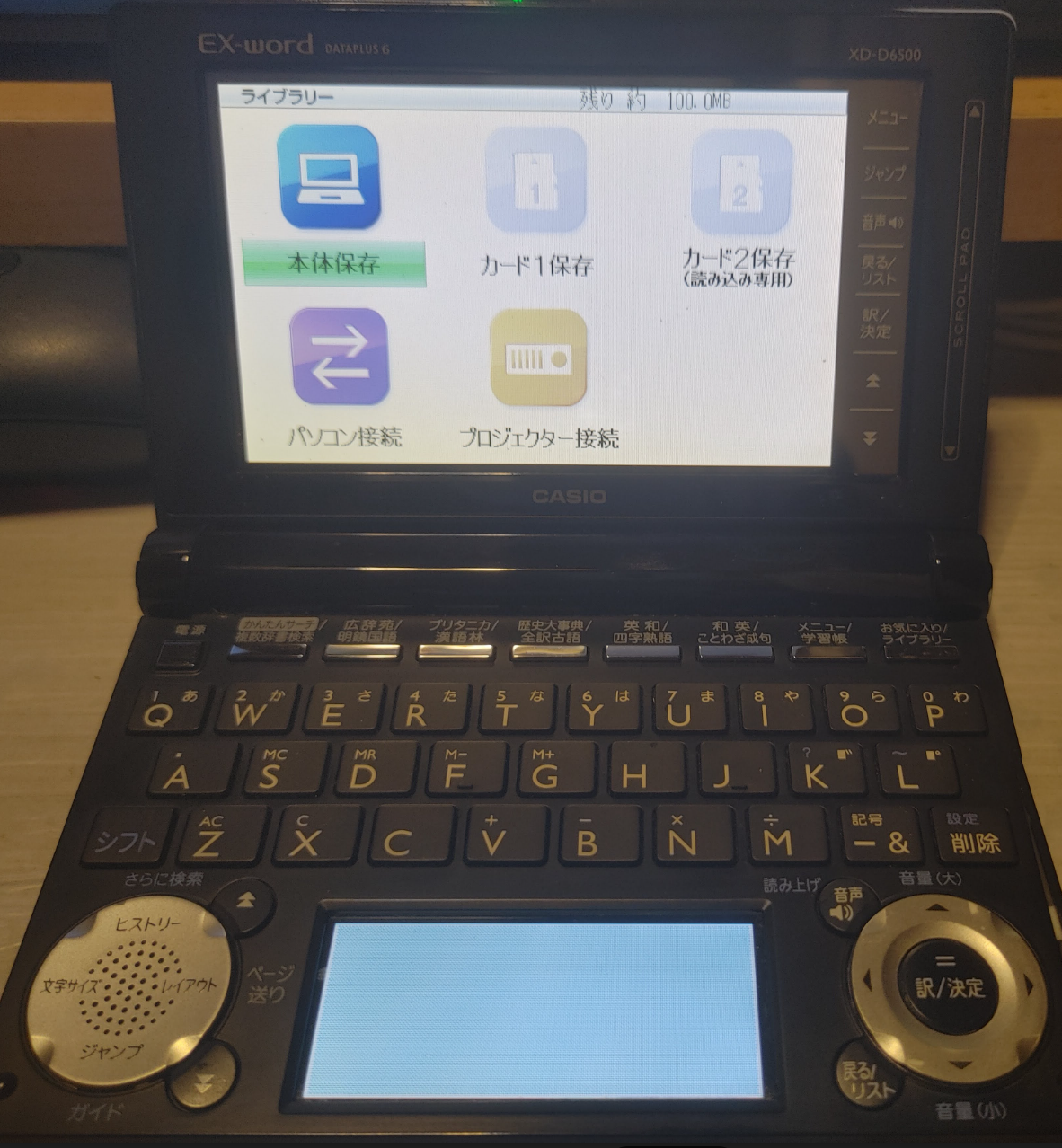
ということで買ってきました。EX-word DATAPLUS 6 XS-D6500
(武蔵小山のハードオフで550円(税抜き)でした。)
“EX-word 接続ツール”(libexword)を導入する
Brainuxはdebian11ベースなので”実質PC”だからうまくいく気がする。ということで、
Brainuxに、「PC と EX-word を接続して様々な操作を行うツール(libexword)」を導入してみます。
こちらのページを参考にインストールします。
Libexword | Brain Wiki | Fandom
インストールに必要なパッケージをインストール
sudo apt install git build-essential libusb-1.0-0-dev libglib2.0-dev libreadline-dev libtool
sudo apt install libopenobex2 libopenobex2-dev
user@brain:~$ sudo apt install git build-essential libusb-1.0-0-dev libglib2.0-dev libreadline-dev libtool
[sudo] password for user:
Reading package lists... Done
Building dependency tree... Done
Reading state information... Done
build-essential is already the newest version (12.9).
git is already the newest version (1:2.30.2-1+deb11u2).
libglib2.0-dev is already the newest version (2.66.8-1+deb11u4).
libglib2.0-dev set to manually installed.
libtool is already the newest version (2.4.6-15).
The following additional packages will be installed:
  libncurses-dev
Suggested packages:
  ncurses-doc readline-doc
Recommended packages:
  libusb-1.0-doc
The following NEW packages will be installed:
  libncurses-dev libreadline-dev libusb-1.0-0-dev
0 upgraded, 3 newly installed, 0 to remove and 2 not upgraded.
Need to get 516 kB of archives.
After this operation, 2,707 kB of additional disk space will be used.
Do you want to continue? [Y/n] Y
Get:1 http://archive.debian.org/debian bullseye/main armel libncurses-dev armel 6.2+20201114-2+deb11u2 [305 kB]
Get:2 http://archive.debian.org/debian bullseye/main armel libreadline-dev armel 8.1-1 [134 kB]
Get:3 http://archive.debian.org/debian bullseye/main armel libusb-1.0-0-dev armel 2:1.0.24-3 [76.1 kB]
Fetched 516 kB in 2s (207 kB/s)
Selecting previously unselected package libncurses-dev:armel.
(Reading database ... 59923 files and directories currently installed.)
Preparing to unpack .../libncurses-dev_6.2+20201114-2+deb11u2_armel.deb ...
Unpacking libncurses-dev:armel (6.2+20201114-2+deb11u2) ...
Selecting previously unselected package libreadline-dev:armel.
Preparing to unpack .../libreadline-dev_8.1-1_armel.deb ...
Unpacking libreadline-dev:armel (8.1-1) ...
Selecting previously unselected package libusb-1.0-0-dev:armel.
Preparing to unpack .../libusb-1.0-0-dev_2%3a1.0.24-3_armel.deb ...
Unpacking libusb-1.0-0-dev:armel (2:1.0.24-3) ...
Setting up libncurses-dev:armel (6.2+20201114-2+deb11u2) ...
Setting up libusb-1.0-0-dev:armel (2:1.0.24-3) ...
Setting up libreadline-dev:armel (8.1-1) ...
Processing triggers for man-db (2.9.4-2) ...
user@brain:~$
libexword のソースコードを取得
libexword のソースコードを取得します
cd
mkdir libexword
cd libexword/
git clone --depth 1 -b '2.0-dev' https://github.com/brijohn/libexword.git
cd libexword/
user@brain:~$ mkdir libexword
user@brain:~$ cd libexword/
user@brain:~/libexword$ ls
user@brain:~/libexword$ git clone --depth 1 -b '2.0-dev' https://github.com/brijohn/libexword.git
Cloning into 'libexword'...
remote: Enumerating objects: 42, done.
remote: Counting objects: 100% (42/42), done.
remote: Compressing objects: 100% (39/39), done.
remote: Total 42 (delta 0), reused 25 (delta 0), pack-reused 0 (from 0)
Receiving objects: 100% (42/42), 83.03 KiB | 393.00 KiB/s, done.
user@brain:~/libexword$
user@brain:~/libexword$
user@brain:~/libexword$ ls
libexword
user@brain:~/libexword$ cd libexword/
user@brain:~/libexword/libexword$ ls
AUTHORS     configure.ac     m4           NEWS          src
autogen.sh  docs             Makefile.am  protocol.txt
ChangeLog   libexword.pc.in  models.txt   README
user@brain:~/libexword/libexword$
libexwordのビルド
libexwordをビルドします。
が、そのままだとARM CPUの場合に一部動作がおかしくなるので一部修正も行います。
$ vi configure.ac
 AM_PROG_CC_C_O

+CFLAGS="$CFLAGS -fsigned-char"
+
 AC_PATH_PROGS([DOX_PROG], [doxygen], missing)
$ ./autogen.sh
$ make
$ sudo make install
$ sudo ldconfig
$ sudo mkdir -p /root/.local/share/exword/ja
user@brain:~/libexword/libexword$ ./autogen.sh
libtoolize: putting auxiliary files in '.'.
libtoolize: linking file './ltmain.sh'
libtoolize: putting macros in AC_CONFIG_MACRO_DIRS, 'm4'.
libtoolize: linking file 'm4/libtool.m4'
libtoolize: linking file 'm4/ltoptions.m4'
libtoolize: linking file 'm4/ltsugar.m4'
libtoolize: linking file 'm4/ltversion.m4'
libtoolize: linking file 'm4/lt~obsolete.m4'
configure.ac:15: installing './ar-lib'
configure.ac:15: installing './compile'
configure.ac:16: installing './config.guess'
configure.ac:16: installing './config.sub'
configure.ac:6: installing './install-sh'
configure.ac:6: installing './missing'
Makefile.am: installing './INSTALL'
Makefile.am: installing './COPYING' using GNU General Public License v3 file
Makefile.am:     Consider adding the COPYING file to the version control system
Makefile.am:     for your code, to avoid questions about which license your project uses
src/Makefile.am: installing './depcomp'
src/swig/Makefile.am:6: installing './py-compile'
checking for a BSD-compatible install... /usr/bin/install -c
checking whether build environment is sane... yes
checking for a thread-safe mkdir -p... /usr/bin/mkdir -p
checking for gawk... no
checking for mawk... mawk
checking whether make sets $(MAKE)... yes
checking whether make supports nested variables... yes
checking whether make supports the include directive... yes (GNU style)
checking for gcc... gcc
checking whether the C compiler works... yes
checking for C compiler default output file name... a.out
checking for suffix of executables...
checking whether we are cross compiling... no
checking for suffix of object files... o
checking whether we are using the GNU C compiler... yes
checking whether gcc accepts -g... yes
checking for gcc option to accept ISO C89... none needed
checking whether gcc understands -c and -o together... yes
checking dependency style of gcc... gcc3
checking for ar... ar
checking the archiver (ar) interface... ar
checking build system type... armv5tejl-unknown-linux-gnueabi
checking host system type... armv5tejl-unknown-linux-gnueabi
checking how to print strings... printf
checking for a sed that does not truncate output... /usr/bin/sed
checking for grep that handles long lines and -e... /usr/bin/grep
checking for egrep... /usr/bin/grep -E
checking for fgrep... /usr/bin/grep -F
checking for ld used by gcc... /usr/bin/ld
checking if the linker (/usr/bin/ld) is GNU ld... yes
checking for BSD- or MS-compatible name lister (nm)... /usr/bin/nm -B
checking the name lister (/usr/bin/nm -B) interface... BSD nm
checking whether ln -s works... yes
checking the maximum length of command line arguments... 1572864
checking how to convert armv5tejl-unknown-linux-gnueabi file names to armv5tejl-unknown-linux-gnueabi format... func_convert_file_noop
checking how to convert armv5tejl-unknown-linux-gnueabi file names to toolchain format... func_convert_file_noop
checking for /usr/bin/ld option to reload object files... -r
checking for objdump... objdump
checking how to recognize dependent libraries... pass_all
checking for dlltool... no
checking how to associate runtime and link libraries... printf %s\n
checking for archiver @FILE support... @
checking for strip... strip
checking for ranlib... ranlib
checking command to parse /usr/bin/nm -B output from gcc object... ok
checking for sysroot... no
checking for a working dd... /usr/bin/dd
checking how to truncate binary pipes... /usr/bin/dd bs=4096 count=1
checking for mt... mt
checking if mt is a manifest tool... no
checking how to run the C preprocessor... gcc -E
checking for ANSI C header files... yes
checking for sys/types.h... yes
checking for sys/stat.h... yes
checking for stdlib.h... yes
checking for string.h... yes
checking for memory.h... yes
checking for strings.h... yes
checking for inttypes.h... yes
checking for stdint.h... yes
checking for unistd.h... yes
checking for dlfcn.h... yes
checking for objdir... .libs
checking if gcc supports -fno-rtti -fno-exceptions... no
checking for gcc option to produce PIC... -fPIC -DPIC
checking if gcc PIC flag -fPIC -DPIC works... yes
checking if gcc static flag -static works... yes
checking if gcc supports -c -o file.o... yes
checking if gcc supports -c -o file.o... (cached) yes
checking whether the gcc linker (/usr/bin/ld) supports shared libraries... yes
checking whether -lc should be explicitly linked in... no
checking dynamic linker characteristics... GNU/Linux ld.so
checking how to hardcode library paths into programs... immediate
checking whether stripping libraries is possible... yes
checking if libtool supports shared libraries... yes
checking whether to build shared libraries... yes
checking whether to build static libraries... yes
checking for doxygen... /usr/bin/doxygen
checking for swig... no
checking for swig2.0... no
checking for stdlib.h... (cached) yes
checking for string.h... (cached) yes
checking readline/readline.h usability... yes
checking readline/readline.h presence... yes
checking for readline/readline.h... yes
checking for readline in -lreadline... yes
checking for iconv_open... yes
checking for pkg-config... /usr/bin/pkg-config
checking pkg-config is at least version 0.9.0... yes
checking for libusb-1.0 >= 1.0... yes
checking that generated files are newer than configure... done
configure: creating ./config.status
config.status: creating Makefile
config.status: creating src/Makefile
config.status: creating src/swig/Makefile
config.status: creating docs/Makefile
config.status: creating libexword.pc
config.status: creating config.h
config.status: executing depfiles commands
config.status: executing libtool commands
user@brain:~/libexword/libexword$
user@brain:~/libexword/libexword$
user@brain:~/libexword/libexword$
user@brain:~/libexword/libexword$ make
make  all-recursive
make[1]: Entering directory '/home/user/libexword/libexword'
Making all in src
make[2]: Entering directory '/home/user/libexword/libexword/src'
gcc -DHAVE_CONFIG_H -I. -I..      -g -O2 -MT exword-main.o -MD -MP -MF .deps/exword-main.Tpo -c -o exword-main.o `test -f 'main.c' || echo './'`main.c
mv -f .deps/exword-main.Tpo .deps/exword-main.Po
gcc -DHAVE_CONFIG_H -I. -I..      -g -O2 -MT exword-content.o -MD -MP -MF .deps/exword-content.Tpo -c -o exword-content.o `test -f 'content.c' || echo './'`content.c
mv -f .deps/exword-content.Tpo .deps/exword-content.Po
gcc -DHAVE_CONFIG_H -I. -I..      -g -O2 -MT exword-util.o -MD -MP -MF .deps/exword-util.Tpo -c -o exword-util.o `test -f 'util.c' || echo './'`util.c
mv -f .deps/exword-util.Tpo .deps/exword-util.Po
/bin/bash ../libtool  --tag=CC   --mode=compile gcc -DHAVE_CONFIG_H -I. -I..    -I/usr/include/libusb-1.0   -g -O2 -MT libexword_la-exword.lo -MD -MP -MF .deps/libexword_la-exword.Tpo -c -o libexword_la-exword.lo `test -f 'exword.c' || echo './'`exword.c
libtool: compile:  gcc -DHAVE_CONFIG_H -I. -I.. -I/usr/include/libusb-1.0 -g -O2 -MT libexword_la-exword.lo -MD -MP -MF .deps/libexword_la-exword.Tpo -c exword.c  -fPIC -DPIC -o .libs/libexword_la-exword.o
libtool: compile:  gcc -DHAVE_CONFIG_H -I. -I.. -I/usr/include/libusb-1.0 -g -O2 -MT libexword_la-exword.lo -MD -MP -MF .deps/libexword_la-exword.Tpo -c exword.c -o libexword_la-exword.o >/dev/null 2>&1
mv -f .deps/libexword_la-exword.Tpo .deps/libexword_la-exword.Plo
/bin/bash ../libtool  --tag=CC   --mode=compile gcc -DHAVE_CONFIG_H -I. -I..    -I/usr/include/libusb-1.0   -g -O2 -MT libexword_la-crypt.lo -MD -MP -MF .deps/libexword_la-crypt.Tpo -c -o libexword_la-crypt.lo `test -f 'crypt.c' || echo './'`crypt.c
libtool: compile:  gcc -DHAVE_CONFIG_H -I. -I.. -I/usr/include/libusb-1.0 -g -O2 -MT libexword_la-crypt.lo -MD -MP -MF .deps/libexword_la-crypt.Tpo -c crypt.c  -fPIC -DPIC -o .libs/libexword_la-crypt.o
libtool: compile:  gcc -DHAVE_CONFIG_H -I. -I.. -I/usr/include/libusb-1.0 -g -O2 -MT libexword_la-crypt.lo -MD -MP -MF .deps/libexword_la-crypt.Tpo -c crypt.c -o libexword_la-crypt.o >/dev/null 2>&1
mv -f .deps/libexword_la-crypt.Tpo .deps/libexword_la-crypt.Plo
/bin/bash ../libtool  --tag=CC   --mode=compile gcc -DHAVE_CONFIG_H -I. -I..    -I/usr/include/libusb-1.0   -g -O2 -MT libexword_la-obex.lo -MD -MP -MF .deps/libexword_la-obex.Tpo -c -o libexword_la-obex.lo `test -f 'obex.c' || echo './'`obex.c
libtool: compile:  gcc -DHAVE_CONFIG_H -I. -I.. -I/usr/include/libusb-1.0 -g -O2 -MT libexword_la-obex.lo -MD -MP -MF .deps/libexword_la-obex.Tpo -c obex.c  -fPIC -DPIC -o .libs/libexword_la-obex.o
libtool: compile:  gcc -DHAVE_CONFIG_H -I. -I.. -I/usr/include/libusb-1.0 -g -O2 -MT libexword_la-obex.lo -MD -MP -MF .deps/libexword_la-obex.Tpo -c obex.c -o libexword_la-obex.o >/dev/null 2>&1
mv -f .deps/libexword_la-obex.Tpo .deps/libexword_la-obex.Plo
/bin/bash ../libtool  --tag=CC   --mode=compile gcc -DHAVE_CONFIG_H -I. -I..    -I/usr/include/libusb-1.0   -g -O2 -MT libexword_la-databuffer.lo -MD -MP -MF .deps/libexword_la-databuffer.Tpo -c -o libexword_la-databuffer.lo `test -f 'databuffer.c' || echo './'`databuffer.c
libtool: compile:  gcc -DHAVE_CONFIG_H -I. -I.. -I/usr/include/libusb-1.0 -g -O2 -MT libexword_la-databuffer.lo -MD -MP -MF .deps/libexword_la-databuffer.Tpo -c databuffer.c  -fPIC -DPIC -o .libs/libexword_la-databuffer.o
libtool: compile:  gcc -DHAVE_CONFIG_H -I. -I.. -I/usr/include/libusb-1.0 -g -O2 -MT libexword_la-databuffer.lo -MD -MP -MF .deps/libexword_la-databuffer.Tpo -c databuffer.c -o libexword_la-databuffer.o >/dev/null 2>&1
mv -f .deps/libexword_la-databuffer.Tpo .deps/libexword_la-databuffer.Plo
/bin/bash ../libtool  --tag=CC   --mode=link gcc -I/usr/include/libusb-1.0   -g -O2 -version-info 2:0:0   -o libexword.la -rpath /usr/local/lib libexword_la-exword.lo libexword_la-crypt.lo libexword_la-obex.lo libexword_la-databuffer.lo -lusb-1.0
libtool: link: gcc -shared  -fPIC -DPIC  .libs/libexword_la-exword.o .libs/libexword_la-crypt.o .libs/libexword_la-obex.o .libs/libexword_la-databuffer.o   -lusb-1.0  -g -O2   -Wl,-soname -Wl,libexword.so.2 -o .libs/libexword.so.2.0.0
libtool: link: (cd ".libs" && rm -f "libexword.so.2" && ln -s "libexword.so.2.0.0" "libexword.so.2")
libtool: link: (cd ".libs" && rm -f "libexword.so" && ln -s "libexword.so.2.0.0" "libexword.so")
libtool: link: ar cr .libs/libexword.a  libexword_la-exword.o libexword_la-crypt.o libexword_la-obex.o libexword_la-databuffer.o
libtool: link: ranlib .libs/libexword.a
libtool: link: ( cd ".libs" && rm -f "libexword.la" && ln -s "../libexword.la" "libexword.la" )
/bin/bash ../libtool  --tag=CC   --mode=link gcc   -g -O2   -o exword exword-main.o exword-content.o exword-util.o -lreadline libexword.la
libtool: link: gcc -g -O2 -o .libs/exword exword-main.o exword-content.o exword-util.o  -lreadline ./.libs/libexword.so
make[2]: Leaving directory '/home/user/libexword/libexword/src'
Making all in src/swig
make[2]: Entering directory '/home/user/libexword/libexword/src/swig'
make  all-am
make[3]: Entering directory '/home/user/libexword/libexword/src/swig'
make[3]: Nothing to be done for 'all-am'.
make[3]: Leaving directory '/home/user/libexword/libexword/src/swig'
make[2]: Leaving directory '/home/user/libexword/libexword/src/swig'
Making all in docs
make[2]: Entering directory '/home/user/libexword/libexword/docs'
Creating Documentation
warning: Tag 'TCL_SUBST' at line 203 of file 'doxy.cfg' has become obsolete.
         To avoid this warning please remove this line from your configuration file or upgrade it using "doxygen -u"
warning: Tag 'SYMBOL_CACHE_SIZE' at line 336 of file 'doxy.cfg' has become obsolete.
         To avoid this warning please remove this line from your configuration file or upgrade it using "doxygen -u"
warning: Tag 'COLS_IN_ALPHA_INDEX' at line 848 of file 'doxy.cfg' has become obsolete.
         To avoid this warning please remove this line from your configuration file or upgrade it using "doxygen -u"
warning: Tag 'XML_SCHEMA' at line 1403 of file 'doxy.cfg' has become obsolete.
         To avoid this warning please remove this line from your configuration file or upgrade it using "doxygen -u"
warning: Tag 'XML_DTD' at line 1409 of file 'doxy.cfg' has become obsolete.
         To avoid this warning please remove this line from your configuration file or upgrade it using "doxygen -u"
warning: Tag 'PERL_PATH' at line 1570 of file 'doxy.cfg' has become obsolete.
         To avoid this warning please remove this line from your configuration file or upgrade it using "doxygen -u"
warning: Tag 'MSCGEN_PATH' at line 1591 of file 'doxy.cfg' has become obsolete.
         To avoid this warning please remove this line from your configuration file or upgrade it using "doxygen -u"
warning: argument 'a4wide' for option PAPER_TYPE is not a valid enum value
Using the default: a4!
warning: doxygen no longer ships with the FreeSans font.
You may want to clear or change DOT_FONTNAME.
Otherwise you run the risk that the wrong font is being used for dot generated graphs.
make[2]: Leaving directory '/home/user/libexword/libexword/docs'
make[2]: Entering directory '/home/user/libexword/libexword'
make[2]: Leaving directory '/home/user/libexword/libexword'
make[1]: Leaving directory '/home/user/libexword/libexword'
user@brain:~/libexword/libexword$
user@brain:~/libexword/libexword$
user@brain:~/libexword/libexword$
user@brain:~/libexword/libexword$ sudo make install
[sudo] password for user:
Making install in src
make[1]: Entering directory '/home/user/libexword/libexword/src'
make[2]: Entering directory '/home/user/libexword/libexword/src'
 /usr/bin/mkdir -p '/usr/local/lib'
 /bin/bash ../libtool   --mode=install /usr/bin/install -c   libexword.la '/usr/local/lib'
libtool: install: /usr/bin/install -c .libs/libexword.so.2.0.0 /usr/local/lib/libexword.so.2.0.0
libtool: install: (cd /usr/local/lib && { ln -s -f libexword.so.2.0.0 libexword.so.2 || { rm -f libexword.so.2 && ln -s libexword.so.2.0.0 libexword.so.2; }; })
libtool: install: (cd /usr/local/lib && { ln -s -f libexword.so.2.0.0 libexword.so || { rm -f libexword.so && ln -s libexword.so.2.0.0 libexword.so; }; })
libtool: install: /usr/bin/install -c .libs/libexword.lai /usr/local/lib/libexword.la
libtool: install: /usr/bin/install -c .libs/libexword.a /usr/local/lib/libexword.a
libtool: install: chmod 644 /usr/local/lib/libexword.a
libtool: install: ranlib /usr/local/lib/libexword.a
libtool: finish: PATH="/usr/local/sbin:/usr/local/bin:/usr/sbin:/usr/bin:/sbin:/bin:/sbin" ldconfig -n /usr/local/lib
----------------------------------------------------------------------
Libraries have been installed in:
   /usr/local/lib

If you ever happen to want to link against installed libraries
in a given directory, LIBDIR, you must either use libtool, and
specify the full pathname of the library, or use the '-LLIBDIR'
flag during linking and do at least one of the following:
   - add LIBDIR to the 'LD_LIBRARY_PATH' environment variable
     during execution
   - add LIBDIR to the 'LD_RUN_PATH' environment variable
     during linking
   - use the '-Wl,-rpath -Wl,LIBDIR' linker flag
   - have your system administrator add LIBDIR to '/etc/ld.so.conf'

See any operating system documentation about shared libraries for
more information, such as the ld(1) and ld.so(8) manual pages.
----------------------------------------------------------------------
 /usr/bin/mkdir -p '/usr/local/bin'
  /bin/bash ../libtool   --mode=install /usr/bin/install -c exword '/usr/local/bin'
libtool: install: /usr/bin/install -c .libs/exword /usr/local/bin/exword
 /usr/bin/mkdir -p '/usr/local/include'
 /usr/bin/install -c -m 644 exword.h '/usr/local/include'
make[2]: Leaving directory '/home/user/libexword/libexword/src'
make[1]: Leaving directory '/home/user/libexword/libexword/src'
Making install in src/swig
make[1]: Entering directory '/home/user/libexword/libexword/src/swig'
make  install-am
make[2]: Entering directory '/home/user/libexword/libexword/src/swig'
make[3]: Entering directory '/home/user/libexword/libexword/src/swig'
make[3]: Leaving directory '/home/user/libexword/libexword/src/swig'
make[2]: Leaving directory '/home/user/libexword/libexword/src/swig'
make[1]: Leaving directory '/home/user/libexword/libexword/src/swig'
Making install in docs
make[1]: Entering directory '/home/user/libexword/libexword/docs'
Creating Documentation
warning: Tag 'TCL_SUBST' at line 203 of file 'doxy.cfg' has become obsolete.
         To avoid this warning please remove this line from your configuration file or upgrade it using "doxygen -u"
warning: Tag 'SYMBOL_CACHE_SIZE' at line 336 of file 'doxy.cfg' has become obsolete.
         To avoid this warning please remove this line from your configuration file or upgrade it using "doxygen -u"
warning: Tag 'COLS_IN_ALPHA_INDEX' at line 848 of file 'doxy.cfg' has become obsolete.
         To avoid this warning please remove this line from your configuration file or upgrade it using "doxygen -u"
warning: Tag 'XML_SCHEMA' at line 1403 of file 'doxy.cfg' has become obsolete.
         To avoid this warning please remove this line from your configuration file or upgrade it using "doxygen -u"
warning: Tag 'XML_DTD' at line 1409 of file 'doxy.cfg' has become obsolete.
         To avoid this warning please remove this line from your configuration file or upgrade it using "doxygen -u"
warning: Tag 'PERL_PATH' at line 1570 of file 'doxy.cfg' has become obsolete.
         To avoid this warning please remove this line from your configuration file or upgrade it using "doxygen -u"
warning: Tag 'MSCGEN_PATH' at line 1591 of file 'doxy.cfg' has become obsolete.
         To avoid this warning please remove this line from your configuration file or upgrade it using "doxygen -u"
warning: argument 'a4wide' for option PAPER_TYPE is not a valid enum value
Using the default: a4!
warning: doxygen no longer ships with the FreeSans font.
You may want to clear or change DOT_FONTNAME.
Otherwise you run the risk that the wrong font is being used for dot generated graphs.
make[2]: Entering directory '/home/user/libexword/libexword/docs'
make[2]: Nothing to be done for 'install-exec-am'.
make[2]: Nothing to be done for 'install-data-am'.
make[2]: Leaving directory '/home/user/libexword/libexword/docs'
make[1]: Leaving directory '/home/user/libexword/libexword/docs'
make[1]: Entering directory '/home/user/libexword/libexword'
make[2]: Entering directory '/home/user/libexword/libexword'
make[2]: Nothing to be done for 'install-exec-am'.
 /usr/bin/mkdir -p '/usr/local/share/exword'
 /usr/bin/install -c -m 644 models.txt '/usr/local/share/exword'
 /usr/bin/mkdir -p '/usr/local/lib/pkgconfig'
 /usr/bin/install -c -m 644 libexword.pc '/usr/local/lib/pkgconfig'
make[2]: Leaving directory '/home/user/libexword/libexword'
make[1]: Leaving directory '/home/user/libexword/libexword'
user@brain:~/libexword/libexword$ sudo ldconfig
user@brain:~/libexword/libexword$ sudo mkdir -p /root/.local/share/exword/ja
user@brain:~/libexword/libexword$
コマンドが実行出来るか確認
試しに実行して見ます
$ sudo bash
# exword
まずは動いてますね。
user@brain:/home/user/libexword/libexword# sudo bash
root@brain:/home/user/libexword/libexword# exword
Exword dictionary tool.
Type 'help' for a list of commands.
>> help
connect [mode] [region] - connect to attached dictionary
disconnect              - disconnect from dictionary
model                   - display model information
capacity                - display medium capacity
format                  - format SD card
list                    - list files
delete <filename>       - delete a file
send <filename>         - upload a file
get <filename>          - download a file
setpath <path>          - changes directory on dictionary
cd <sub-function>       - audio cd commands
dict <sub-function>     - add-on dictionary commands
set <option> [value]    - sets program options
exit                    - exits program
>>exit
root@brain:/home/user/libexword/libexword#
BrainからEX-wordに接続してみる
まずは、EX-Word側の1番側スロットにSdカード入れておきます。
・電源を入れて、ライブラリーボタン -> ライブラリー ボタン -> パソコン接続を起動します。
・Brain側のUSBホストアダプタと、EX wordをUSBケーブルで接続します。
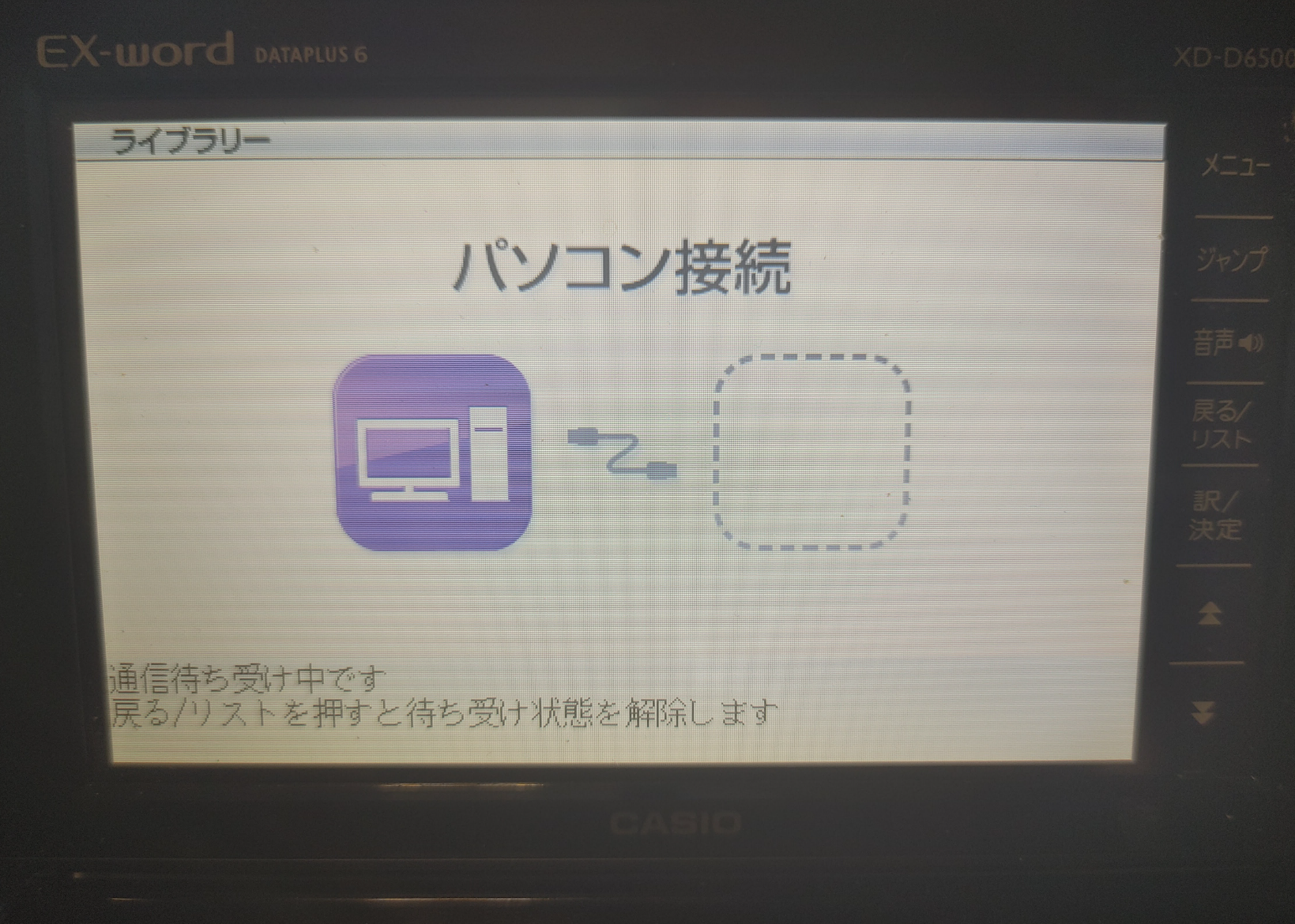
・USBケーブルで接続すると、Brain側では、Ex wordをusbデバイスとして認識します。
$ lsusb
Bus 001 Device 007: ID 07cf:6101 Casio Computer Co., Ltd fx-9750gII
user@brain:~/libexword/libexword$ lsusb
Bus 001 Device 006: ID 0b95:772b ASIX Electronics Corp. AX88772B
Bus 001 Device 005: ID 1997:2433 Shenzhen Riitek Technology Co., Ltd wireless mini keyboard with touchpad
Bus 001 Device 004: ID 413c:301a Dell Computer Corp. Dell MS116 Optical Mouse
Bus 001 Device 007: ID 07cf:6101 Casio Computer Co., Ltd fx-9750gII
Bus 001 Device 002: ID 05e3:0610 Genesys Logic, Inc. Hub
Bus 001 Device 001: ID 1d6b:0002 Linux Foundation 2.0 root hub
・実際に接続してみます。
以下の流れでは、接続、EXwordの情報、ExwotdのSDカードにファイル転送しています。
なお、root権限での操作が必要です。
(setpathしないままで、listコマンドを実行すると、Segmentation faultエラーになるのでSDカード(crd0://)のほうを操作しています)
$ sudo bash
# exword
>> connect
>> model
>> capacity
>> setpath crd0://
>> capacity
>> list
>> send README
>> list
>> disconnect
>> exit
user@brain:~/libexword/libexword$ sudo bash
root@brain:/home/user/libexword/libexword# exword
Exword dictionary tool.
Type 'help' for a list of commands.
>> help
connect [mode] [region] - connect to attached dictionary
disconnect              - disconnect from dictionary
model                   - display model information
capacity                - display medium capacity
format                  - format SD card
list                    - list files
delete <filename>       - delete a file
send <filename>         - upload a file
get <filename>          - download a file
setpath <path>          - changes directory on dictionary
cd <sub-function>       - audio cd commands
dict <sub-function>     - add-on dictionary commands
set <option> [value]    - sets program options
exit                    - exits program
>> connect
connecting to device...done
\_INTERNAL_00\ >> model
Model: gy131,ON,0100
Sub: gy999
Extended: CY400
Capabilities: SW P F C CC
\_INTERNAL_00\ >> capacity
Capacity: 104857600 / 104645940
\_INTERNAL_00\ >> setpath crd0://
\_SD_00\ >>
\_SD_00\ >> capacity
Capacity: 31253889024 / 31253725184
\_SD_00\ >>
\_SD_00\ >> list
<SYSTEM~1>
OK, Success
\_SD_00\ >>
\_SD_00\ >> send README
uploading...OK, Success
\_SD_00\ >>
\_SD_00\ >> list
<SYSTEM~1>
README
OK, Success
\_SD_00\ >>
\_SD_00\ >> disconnect
disconnecting...done
>> exit
root@brain:/home/user/libexword/libexword#
EX wordに挿していたSDカードの中身を見てみると、
ファイルが保存されていますね。問題なさそうです。
なお、コンパイルオプションの変更なしの状態で発生していた
「デフォルトのパス(_INTERNAL_00/=drv0://)でlist実行するとSegmentation faultエラーが出る件」については、コンパイルオプションの変更で出なくなりました。

Segmentation faultエラーの原因調査
以下、以前の調査状況の記録です(コンパイルオプション変更なし時の動作)。
コンパイルオプションを変更するだけで解決するっぽいです。
内蔵ストレージのList実行時のsegmentation faultの件について調査
同じ Debian 13 でも、x64 と ARM では OBEX の挙動が違うようです。
| 環境 | Debian | CPU | OBEX の挙動 | list の結果 |
|---|---|---|---|---|
| x64 | 13 | x86_64 | BODY → BODY → BODY_END(複数) | 複数行表示される |
| ARM | 13 | ARMv5(Brain) | BODY が 1 回しか返らない | 1 行だけ |
推定理由 1:ARM の libusb がパケットをまとめてしまう
ARMv5 の USB コントローラは古く、 bulk transfer の最大パケットサイズが小さいため、
- x64 → 16KB 以上の転送が一度に来る
- ARM → 4KB など小さい単位で区切られる
その結果:
- x64 → OBEX が複数 BODY を返す
- ARM → OBEX が 1 BODY にまとめて返す(または 1 BODY しか返さない)
推定理由 2:ARM の libopenobex が「BODY_END」を返さないバグ
実際、OpenOBEX には ARM で BODY_END が返らない既知バグがあるそうです。
そのため:
- x64 → BODY, BODY, BODY_END と返る
- ARM → BODY のみ返ってループ終了
dict installしてもex-wordで起動できない
同様に、OBEX 実装の関係かもしれません。
動かない場合はx64のPCでDebianなどの環境で実行して、みてください。
EX-Word用のソフトウェア開発について
現在、BrainHackersのDiscordにてEX-Word用の開発用テンプレートについて
動きがあるようです。
Brain Hackers のDiscordに参加するには、以下のページをご確認ください。
GitHub – brain-hackers/README: Brain Hackers について
現時点でビルド済で公開されているソフトが実質GNUBOYしかない状況ですが、
もしかしたら、EX-Word用のソフトウェアが公開されるかもしれません。
私は、現状GNUBOYの起動もうまくいっていない状況なので、
進捗を期待して、応援しております。
実行テスト(事項ファイル転送)
Hello worldについて、GitHUBの「GitHub Actions」という機能でビルドされたものがあること分かったのでこちらを試してみました(GitHUB勉強しないと・・・)。
ビルド環境の構築までは大変そうでしたので、GitHub Actionsというキーワードからたどりました
Actionsをクリック
→ 一番最近のBuildをクリック
→ build.ymlのBuild EX-word addion をクリック
→ Publishの下に、あるURLをクリック
https://github.com/watamario15/exword-devel/releases/tag/v1
2026/01/24時点では
https://github.com/brain-hackers/exword-template
から、右ペイン側のReleasesから最新のリリース(v1)をたどって
以下のURLからでも、build.zipを入手できるようです。
https://github.com/brain-hackers/exword-template/releases/tag/v1
$ cd
vcd exqord
$ mkdir HELLO
$ cd HELLO
$ https://github.com/brain-hackers/exword-template/releases/download/v1/build.zip
$ unzip build
$ cd build/ja
$ sudo cp -r HELLO/ /root/.local/share/exword/ja/HELLO
$ sudo bash
# exword
>> connect
>> dict reset brain
>> dict auth brain 0x4CF94CF9484B484B571E571152DB52DB0ABF0ABF
>> dict install HELLO
>> disconnect
build.zipを解凍して、build/ja/HELLO フォルダの中身を /root/.local/share/exword/ja/HELLOにコピーして
Brainuxから、EX-wordに転送してみたところ、ライブラリのメニューに登録され、
実行できました。
user@brain:~/libexword/build/ja$ sudo cp -r /home/user/libexword/build/ja/HELLO/ /root/.local/share/exword/ja/HELLO
root@brain:/home/user/libexword#
root@brain:/home/user/libexword# exword
Exword dictionary tool.
Type 'help' for a list of commands.
>> connect
connecting to device...done
\_INTERNAL_00\ >> dict reset brain
User brain with key 0x4CF94CF9484B484B571E571152DB52DB0ABF0ABF registered
\_INTERNAL_00\ >>
\_INTERNAL_00\ >> dict auth brain 0x4CF94CF9484B484B571E571152DB52DB0ABF0ABF
Authentication sucessful.
\_INTERNAL_00\ >> dict install HELLO
Transferring infogt5.htm...Done
Transferring diction.htm...Done
Transferring infodp5.htm...Done
Transferring hello.d01...Done
Transferring fileinfo.cji...Done
\_INTERNAL_00\ >> disconnect
disconnecting...done
root@brain:/home/user/libexword#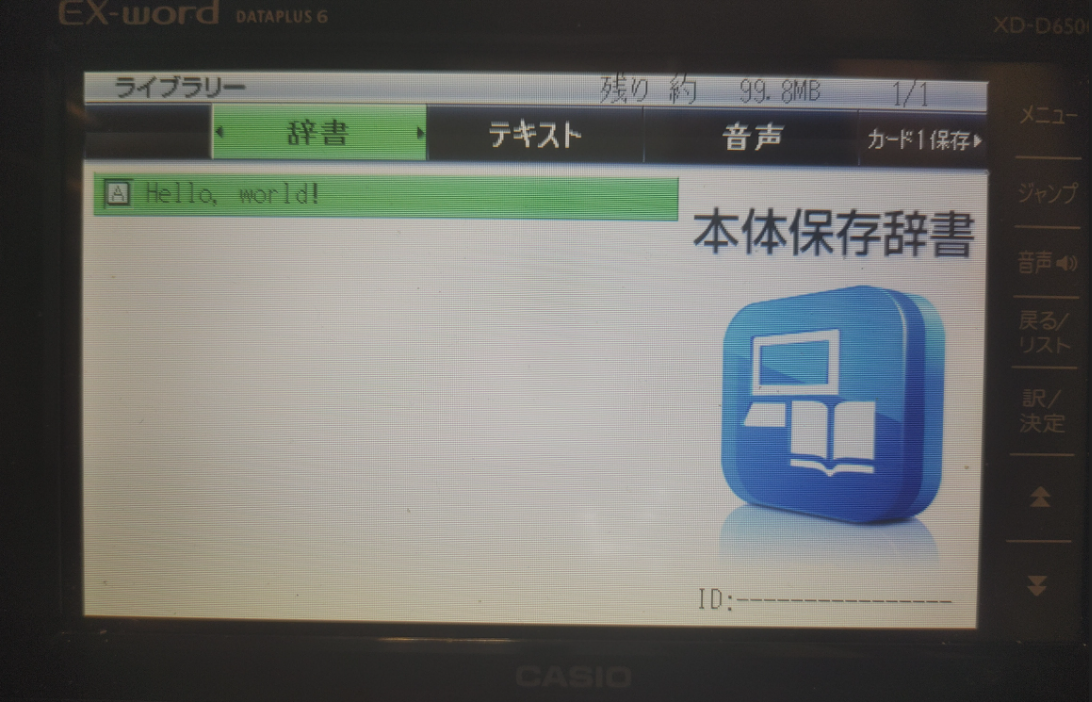
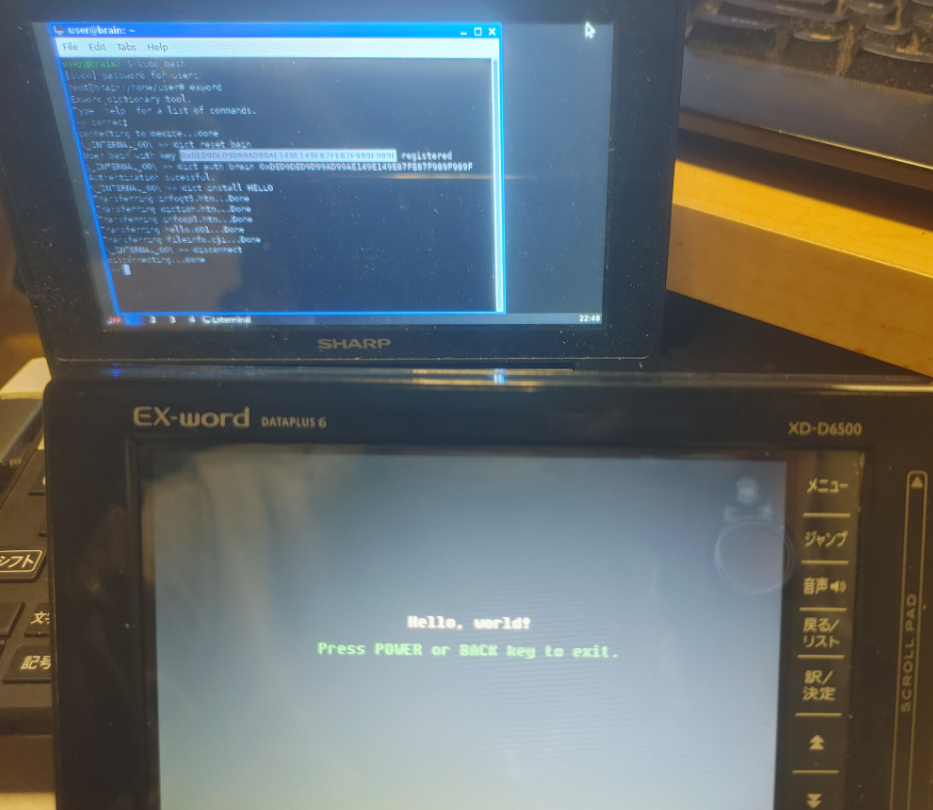
ちなみに x64のDebian13でexwordをビルドする場合は、
コンパイルオプションの変更は必要ありません。
そのままで、正常に起動できることを確認しました。
少し調べた段階ではarm環境では、いくつか不具合があり、
内臓ストレージのlist表示や、dict installしてもex-wordで起動できない状況があるようです。
⇛コンパイルオプションで解決できるとのことです。
CFLAGS=”$CFLAGS -fsigned-char”
Gnuboy EX(後日確認予定)
EX-wordで実行できるツールとして、「Gnuboy EX」が紹介されていました。
GAMEBOT/GAMEBOY Colorのエミュレータになります。
Gnuboy EX | Brain Wiki | Fandom
また、各種ドキュメントはここにあるようです。
インストール(現在試行錯誤中)
現在試行錯誤中です。
手順通りにインストールしたはずなのですが、メニューからGnuboy EXを起動しても、すぐにライブラリに戻っちゃいます。
(以下備考)
前準備
・GNUBY.7z をダウンロードします。
・7zを解凍するためのツールをインストールする。
$ sudo apt install p7zip-fulll
user@brain:~/libexword/libexword$ sudo apt show p7zip-full
Package: p7zip-full
Version: 16.02+dfsg-8
Priority: optional
Section: utils
Source: p7zip
Maintainer: Robert Luberda <robert@debian.org>
Installed-Size: 3,932 kB
Depends: p7zip (= 16.02+dfsg-8), libc6 (>= 2.7), libgcc-s1 (>= 3.5), libstdc++6 (>= 5)
Suggests: p7zip-rar
Breaks: p7zip (<< 15.09+dfsg-3~)
Replaces: p7zip (<< 15.09+dfsg-3~)
Homepage: http://p7zip.sourceforge.net/
Tag: admin::file-distribution, implemented-in::c++, interface::commandline,
 role::program, scope::utility, use::checking, use::compressing,
 works-with-format::tar, works-with-format::zip, works-with::archive,
 works-with::file
Download-Size: 931 kB
APT-Sources: http://archive.debian.org/debian bullseye/main armel Packages
Description: 7z and 7za file archivers with high compression ratio
 p7zip is the Unix command-line port of 7-Zip, a file archiver that
 handles the 7z format which features very high compression ratios.
 .
 p7zip-full provides utilities to pack and unpack 7z archives within
 a shell or using a GUI (such as Ark, File Roller or Nautilus).
 .
 Installing p7zip-full allows File Roller to use the very efficient 7z
 compression format for packing and unpacking files and directories.
 Additionally, it provides the 7z and 7za commands.
 .
 List of supported formats:
   - Packing / unpacking: 7z, ZIP, GZIP, BZIP2, XZ and TAR
   - Unpacking only: APM, ARJ, CAB, CHM, CPIO, CramFS, DEB, DMG, FAT,
     HFS, ISO, LZH, LZMA, LZMA2, MBR, MSI, MSLZ, NSIS, NTFS, RAR (only
     if non-free p7zip-rar package is installed), RPM, SquashFS, UDF,
     VHD, WIM, XAR and Z.
 .
 The dependent package, p7zip, provides 7zr, a light version of 7za,
 and p7zip, a gzip-like wrapper around 7zr.


user@brain:~/libexword/libexword$ sudo apt install p7zip-full
Reading package lists... Done
Building dependency tree... Done
Reading state information... Done
The following additional packages will be installed:
  p7zip
Suggested packages:
  p7zip-rar
The following NEW packages will be installed:
  p7zip p7zip-full
0 upgraded, 2 newly installed, 0 to remove and 2 not upgraded.
Need to get 1,240 kB of archives.
After this operation, 4,753 kB of additional disk space will be used.
Do you want to continue? [Y/n] Y
Get:1 http://archive.debian.org/debian bullseye/main armel p7zip armel 16.02+dfsg-8 [309 kB]
Get:2 http://archive.debian.org/debian bullseye/main armel p7zip-full armel 16.02+dfsg-8 [931 kB]
Fetched 1,240 kB in 3s (439 kB/s)
Selecting previously unselected package p7zip.
(Reading database ... 60037 files and directories currently installed.)
Preparing to unpack .../p7zip_16.02+dfsg-8_armel.deb ...
Unpacking p7zip (16.02+dfsg-8) ...
Selecting previously unselected package p7zip-full.
Preparing to unpack .../p7zip-full_16.02+dfsg-8_armel.deb ...
Unpacking p7zip-full (16.02+dfsg-8) ...
Setting up p7zip (16.02+dfsg-8) ...
Setting up p7zip-full (16.02+dfsg-8) ...
Processing triggers for man-db (2.9.4-2) ...
user@brain:~/libexword/libexword$
設定ファイルの作成と、ダウンロードした”GNUBY.7z”を解凍します。
$ cd /home/user/libexword/
#GNUBOYの定義ファイルを用意します。
vi /home/user/libexword/gnuboy.rc
set romdir \\\\drv0\\  # Where to place the ROM
set savedir \\\\drv0\\  # Where to place the save data
# set skin \\\\drv0\\zelda.gra  # Which skin to load
set sprsort 0  # Improve performance
$cp rom.gbc /home/user/libexword/
$ 7z x GNUBY.7z
$ sudo cp -r /home/user/libexword/GNUBY /root/.local/share/exword/ja/GNUBY
$ cd /home/user/libexword/

$ 7z x GNUBY.7z

7-Zip [32] 16.02 : Copyright (c) 1999-2016 Igor Pavlov : 2016-05-21
p7zip Version 16.02 (locale=en_US.UTF-8,Utf16=on,HugeFiles=on,32 bits,1 CPU LE)

Scanning the drive for archives:
1 file, 43892 bytes (43 KiB)

Extracting archive: GNUBY.7z
--
Path = GNUBY.7z
Type = 7z
Physical Size = 43892
Headers Size = 247
Method = LZMA2:96k
Solid = +
Blocks = 1

Everything is Ok

Folders: 1
Files: 5
Size:       95621
Compressed: 43892

$ sudo cp -r  /home/user/libexword/GNUBY  /root/.local/share/exword/ja/GNUBY
インストール
では、EX-wordにインストールしてみます。
$ cd /home/user/libexword/
$ sudo bash
# exword
>> connect
>> dict reset brain
>> dict auth brain <key>
>> dict install GNUBY
>> send gnuboy.rc
>> send rom.gbc
>> dusconnext
>>exit
# exit
$
user@brain:~/libexword/$ cd /home/user/libexword/
user@brain:~/libexword/$ sudo bash
root@brain:/home/user/libexword# exword
Exword dictionary tool.
Type 'help' for a list of commands.
>> connect
connecting to device...done
\_INTERNAL_00\ >> dict reset brain
User brain
 with key 0x6D556D55687E687E771F771F723072302B132B00 registered
\_INTERNAL_00\ >>
\_INTERNAL_00\ >> dict auth brain 0x6D556D55687E687E771F771F723072302B132B00
Authentication sucessful.
\_INTERNAL_00\ >>
\_INTERNAL_00\ >>
\_INTERNAL_00\ >> dict install GNUBY
Transferring infogt5.htm...Done
Transferring diction.htm...Done
Transferring infodp5.htm...Done
Transferring gnuby.d01...Done
Transferring fileinfo.cji...Done
\_INTERNAL_00\ >>
\_INTERNAL_00\ >> send gnuboy.rc
uploading...OK, Success
\_INTERNAL_00\ >>
\_INTERNAL_00\ >> send rom.gbc
uploading...OK, Success
\_INTERNAL_00\ >>
\_INTERNAL_00\ >> disconnect
disconnecting...done
>> exit
root@brain:/home/user/libexword# exit
user@brain:~/libexword/$
転送ツールの不具合でした。
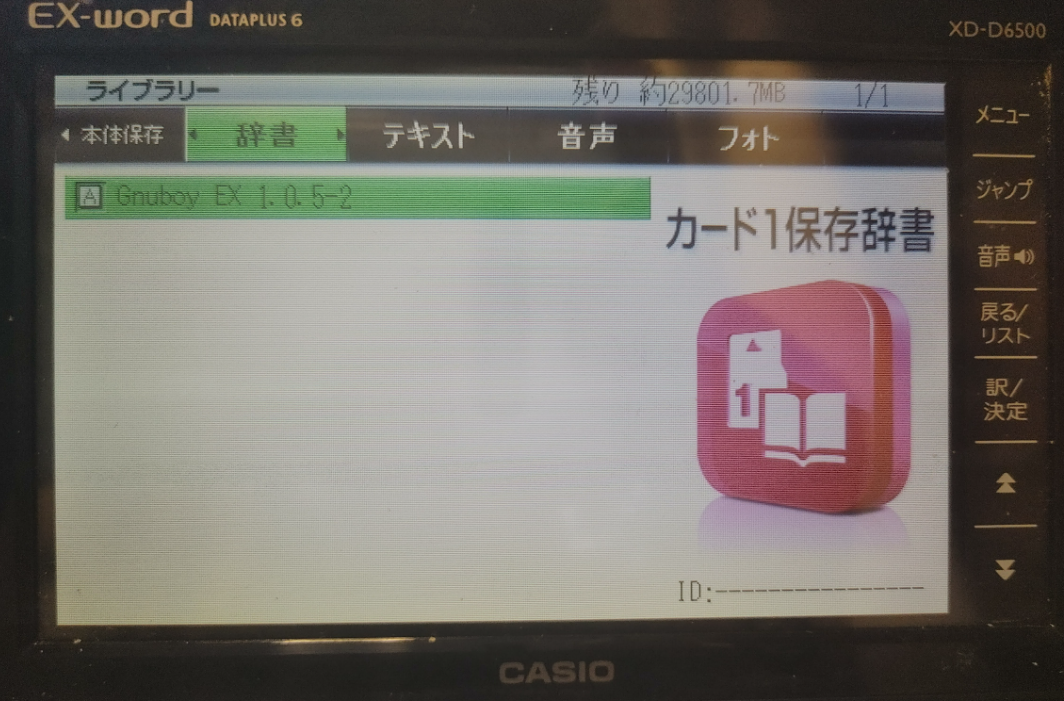
結果、辞書メニューには出てくるのだが、Gnuboy EXが起動する気配がない。
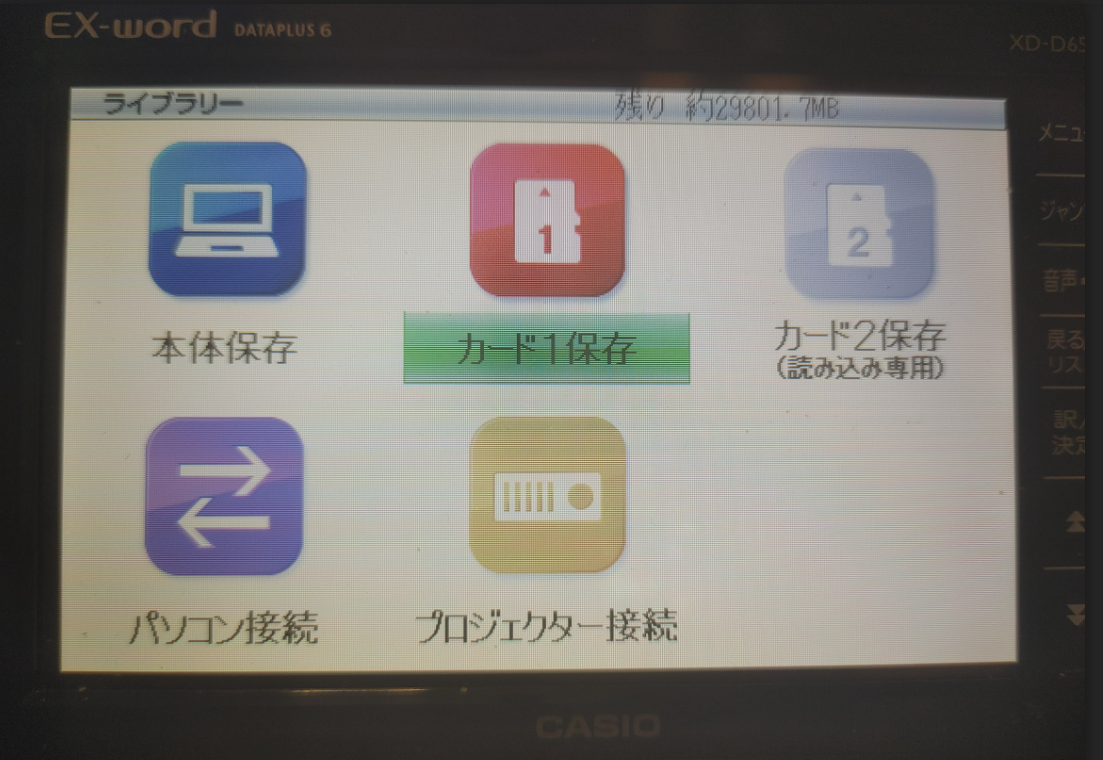
手順通りにインストールしたはずなのですが、メニューからを起動しても、すぐにライブラリ(本体保存やカード1保存の選択の画面)に戻っちゃいます。
SDカード(crd0:にもインストールを試してみましたが同じでした。rcファイルは内容変更済)
それかBrainuxからのインストールでは、無理だったのかな?
最近、インストールファイル中のhtmlファイルの改行コードがCRLFでないと
この現象が出るような話も見かけたのですがちゃんとCRLFになっているようで
まだ原因不明です。
心あたりある方がいればぜひ教えてください。
CASIO EX-word DATAPLUS 5/6/7 File manager
後日確認したいです
つづき
Views: 711
